Start your project

Email Triage

Your inbox, sorted before you open it. Every morning the workflow reads what came in overnight, groups it by what actually needs you, and sends one plain digest. It runs on a local model, so your mail never leaves your machine.

How it runs

  1. Runs on a schedule, every morning before you start
  2. Reads new mail and groups it by importance: act now, reply today, read later
  3. Sends an alert to your phone for the ones that cannot wait
  4. Files the rest into folders and sends the daily digest

What's included

  • A daily digest, grouped by importance
  • Instant alerts for urgent email
  • Automatic filing and labeling in your inbox
  • Runs offline on a local model: nothing leaves your machine

Good for: Owners who start every day digging out from under email.
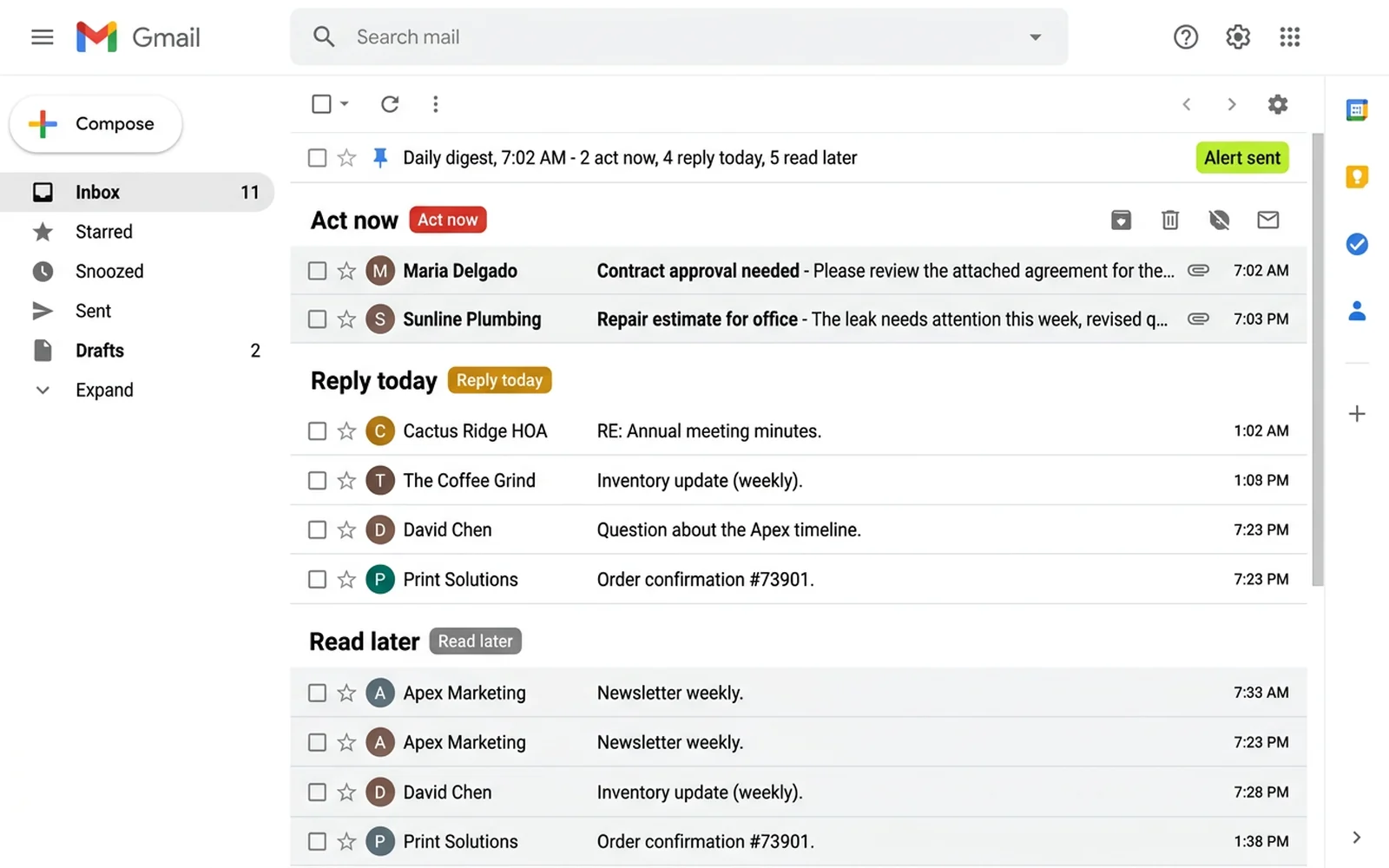
A Gmail inbox filling the frame, grouped into Act now, Reply today and Read later, with a pinned daily digest row marked Alert sent

Knowledge Base Agent

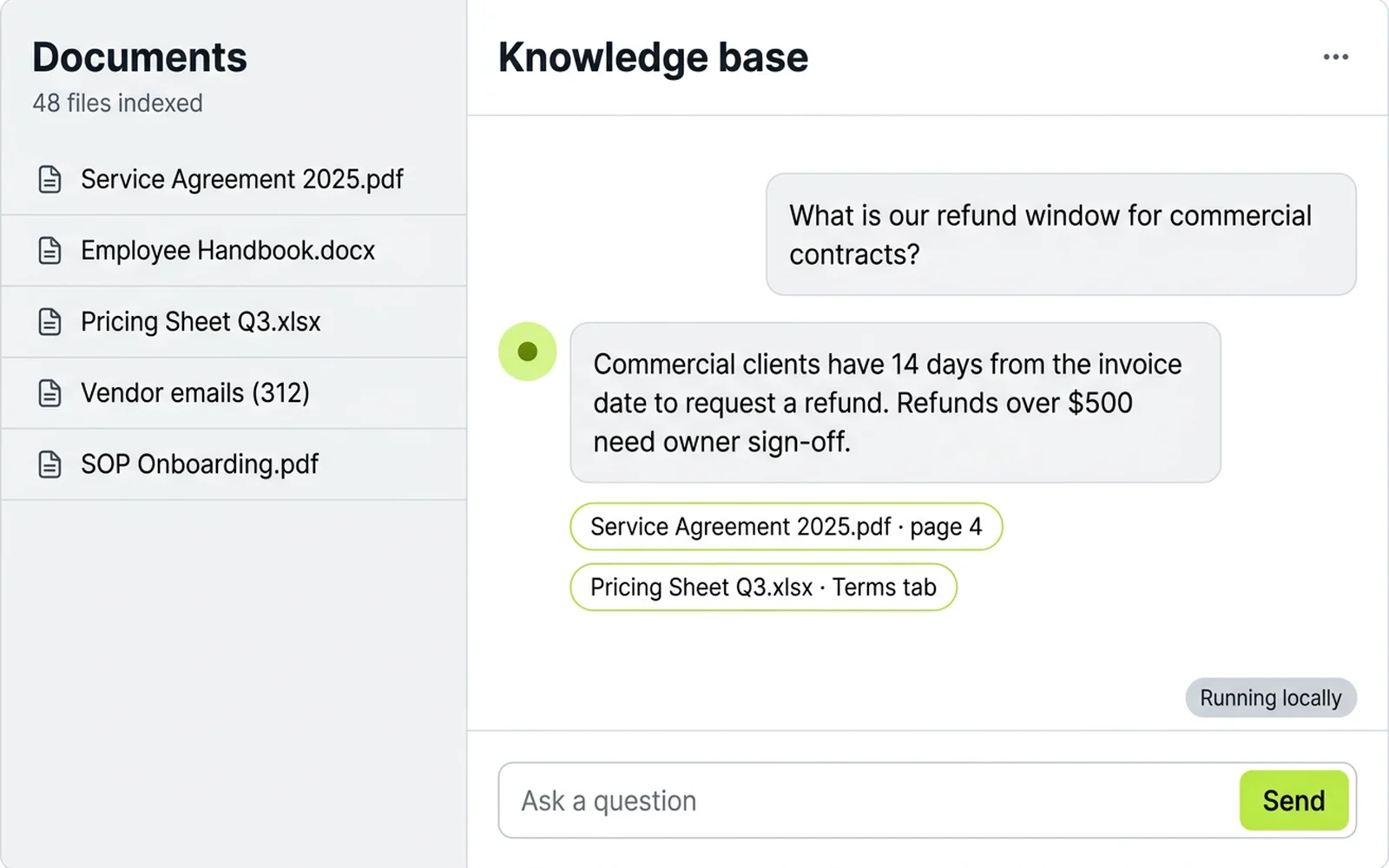
Every manual, contract, procedure and past email in one place you can ask questions of. It answers from your own documents, cites where it found the answer, and runs entirely offline.

How it runs

  1. Your documents are indexed: PDFs, docs, spreadsheets, past email
  2. You ask a question in plain language, from chat or your phone
  3. It finds the passages that answer it and drafts a reply
  4. It cites the source so you can check it in one click

What's included

  • Indexing of the documents you already have
  • Plain-language answers with the source cited
  • Re-indexing on a schedule as documents change
  • Runs offline on a local model: private by default

Good for: Businesses whose answers live in a hundred files nobody can find.

A light-mode knowledge base chat: a Documents sidebar of indexed files, a question about refund windows, and an answer with two cited-source chips and a Running locally badge

Quarterly Earnings Report

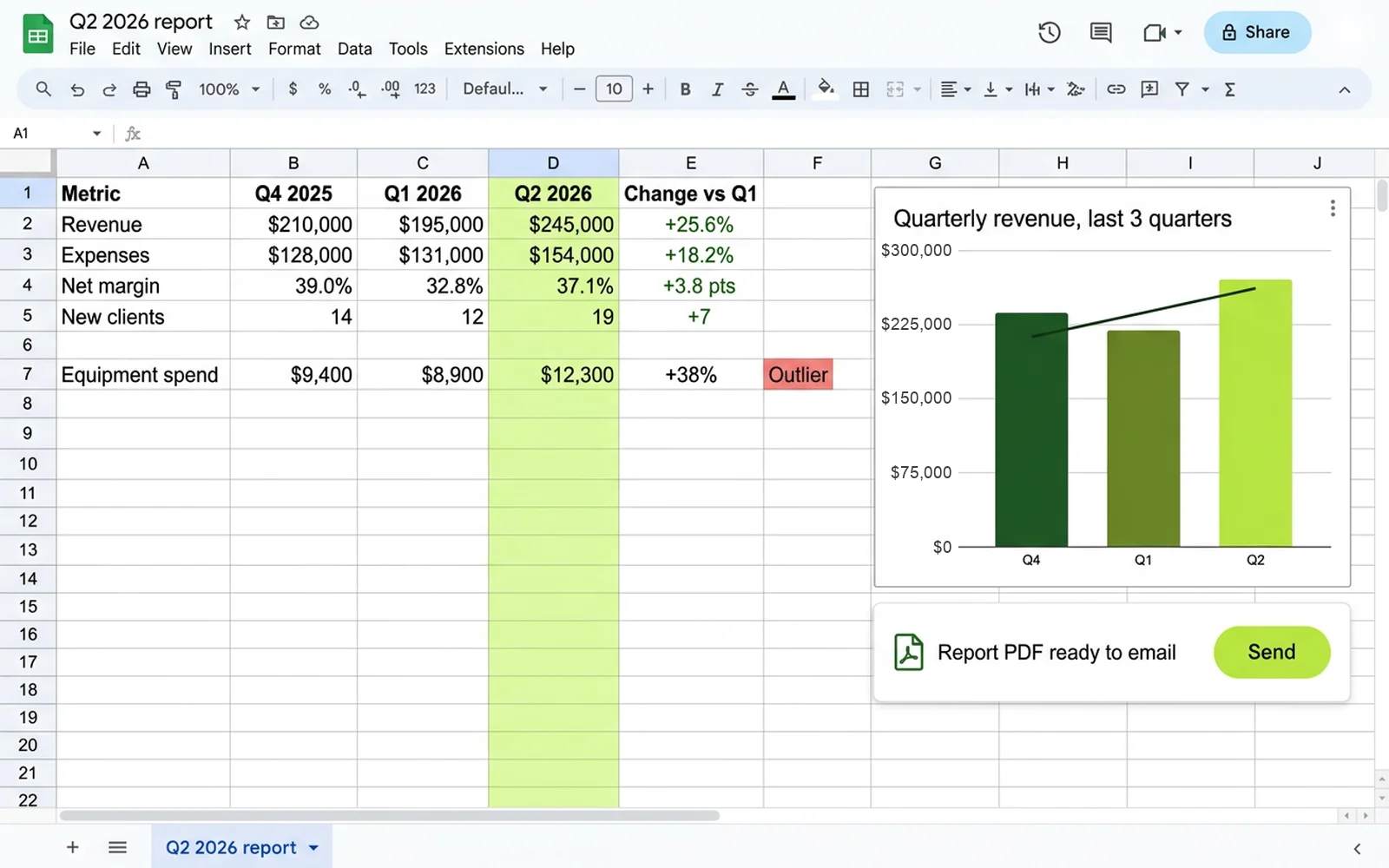
The numbers already live in a spreadsheet. This workflow reads them, compares the last three quarters, and writes the report: trends, differences and outliers, as a PDF you can send as-is.

How it runs

  1. Reads the figures straight from your Google Sheet
  2. Compares the last three quarters, line by line
  3. Calls out the trends, the differences and the outliers
  4. Builds the PDF and a ready-to-send email covering it

What's included

  • A PDF report covering the last three quarters
  • Trend, difference and outlier callouts in plain language
  • Charts built from your own numbers
  • A ready-to-email summary, drafted for you to send

Good for: Owners and partners who want the quarter explained in plain language.

A spreadsheet comparing three quarters of revenue, expenses, margin and new clients, an Outlier tag on equipment spend, a revenue bar chart with a trend line, and a Report PDF ready to email card

Automatic Invoices

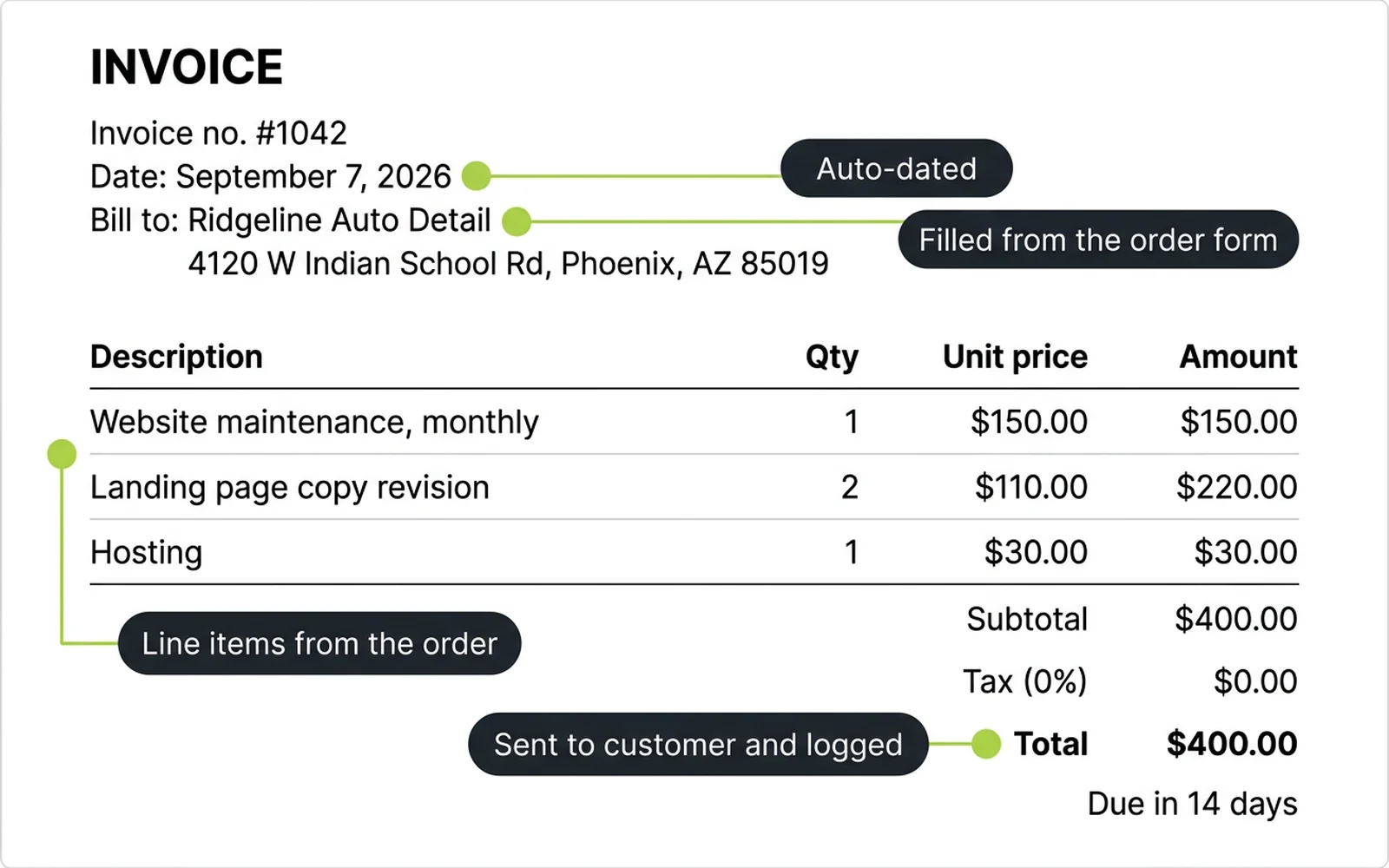
An order comes in and the invoice goes out, without you touching it. Customer details, date and line items are formatted from the form, sent to the customer, and logged.

How it runs

  1. A customer submits your order form
  2. Customer info, date and order items are formatted into an invoice
  3. The invoice is emailed to the customer with a PDF attached
  4. Every invoice is logged to your sheet or accounting tool

What's included

  • An invoice generated the moment an order form is submitted
  • Customer info, date and items formatted automatically
  • Delivery to the customer by email, PDF attached
  • A running log of every invoice sent

Good for: Anyone still building invoices by hand after every order.

A full invoice with bill-to details, three line items and a total, with callouts marking the fields the workflow fills: order form details, auto-dated, line items, sent and logged

Social Media Research

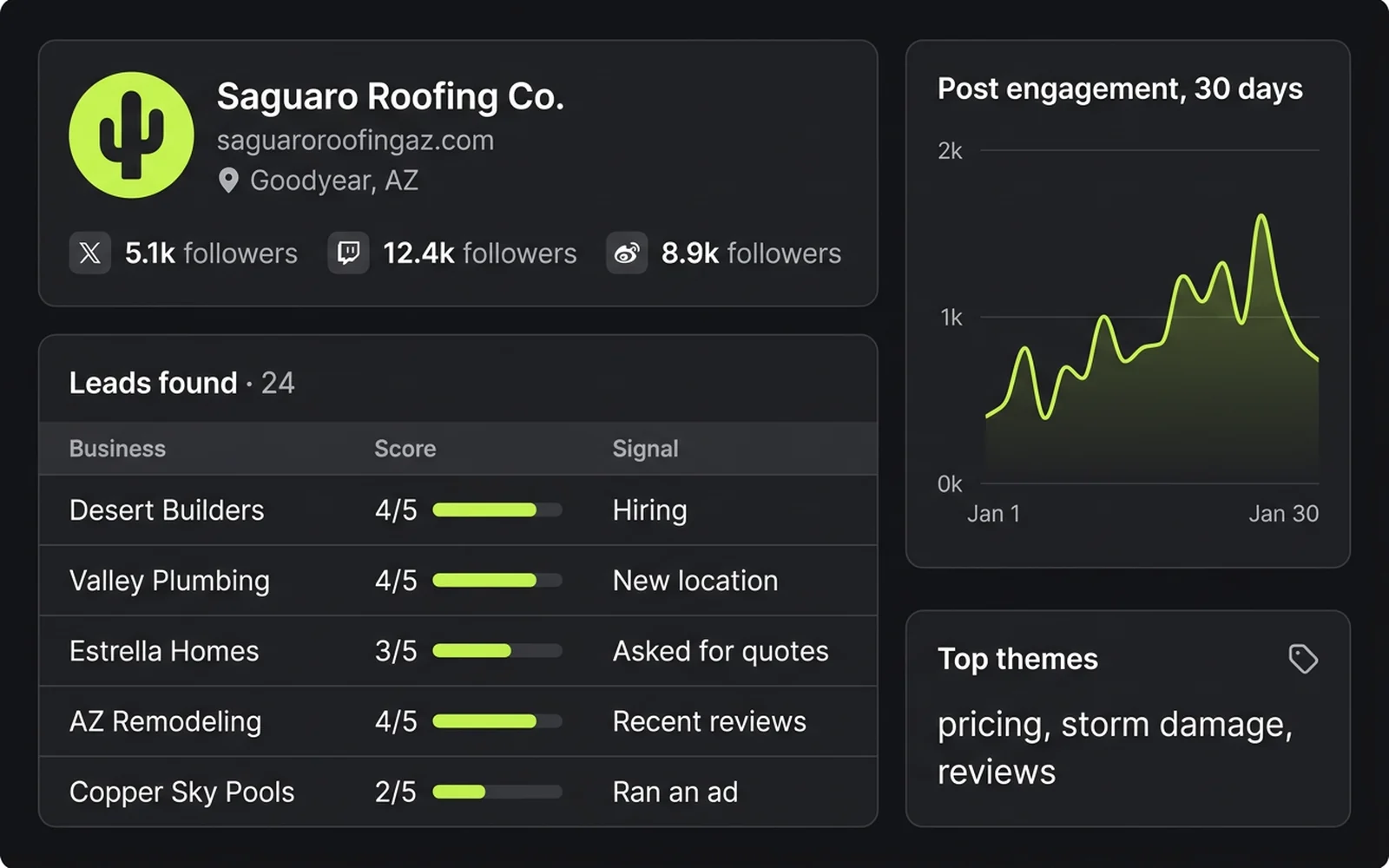
Your prospects are already talking on social. This workflow scans the platforms for the companies you want to reach, pulls what is public, and turns it into a lead list with a read on how each one shows up online.

How it runs

  1. You set the criteria: industry, location, size, keywords
  2. It scans public profiles and posts for matching companies
  3. Company details and contacts are collected into a lead list
  4. Each one gets a short read on activity, reach and posting habits

What's included

  • Company info gathered from public social profiles
  • A lead list scored against your criteria
  • Social media analysis: activity, reach and engagement per account
  • Nothing invented: unknown fields stay blank

Good for: Sales-led businesses that want a researched list before the first call.

A research dashboard filling the frame: a company profile card with follower counts, a Leads found table with scores and signals, a 30-day engagement chart and top themes

Straight answers

The questions every first call starts with

Anything missing? Ask in the form below and you will hear back within one business day.

What platform do you build on?

Self-hosted n8n for the workflows, and a local language model on hardware you control for email triage and the knowledge base. You own the workflows, the data and the keys. No per-seat SaaS fees, and nothing to migrate away from if you ever do.

What does offline mean?

Email triage and the knowledge base agent run on a language model installed on a machine you control. Your mail and documents are read there and never sent to a cloud service. They keep working without an internet connection.

What do you need from me?

A discovery call to map the job, plus access to the tools it touches: your inbox, the spreadsheet, the order form, or the documents you want indexed. We handle the rest.

How long does a build take?

A single automation is usually live within a couple of weeks, including a test period where you watch it run. A full stack of five is scoped as a project with a clear timeline.

What if something breaks?

Workflows are monitored, and you get a plain-language alert when a run fails. Care includes keeping them running as your tools change underneath.

Who owns the workflows?

You do. They run on infrastructure in your name, with your keys, and you get the full source at handover. Take them anywhere.

Ready to get started?

Let's build something great together.

Interested in these possible add-ons

Prefer email? alex@plantedpixels.com